
|
Book Home Page Bloglines 1906 CelebrateStadium 2006 OfficeZealot Scobleizer TechRepublic AskWoody SpyJournal Computers Software Microsoft Windows Excel FrontPage PowerPoint Outlook Word 

Host your Web site with PureHost! 
|
 
Saturday, May 13, 2017 – Permalink – Update the FUI RibbonLet the add-ins beginIt is said that the Office 2007 Graphical User Interface Ribbon cannot be as easily changed or modified like it has been in previous versions. This may be partially true, but not all is lost. Here is some information from the equine's mouth: Learn how to customize the Ribbon user interface (UI) in the 2007+ Microsoft Office release. Also learn how new features in Microsoft Visual Studio 2005 Tools for the 2007+ Microsoft Office System support RAD development of Ribbon customization. (40 printed pages) Customizing the Office Ribbon Monsieurs MS also have a downloadable spreadsheets with the Control IDs. There are files for 2003 as well. Lists of Control IDs 2007 Office System Add-In: Icons Gallery 2013 Icons Gallery See all Topics powerpoint <Doug Klippert@ 3:21 AM
Comments:
Post a Comment
Monday, October 17, 2016 – Permalink – Custom QATAccess additionsApplications put most of the most-used commands on the Home tab's Ribbon, not everything is there. You may want to add Close, Close All, or Print commands, for example. In the upper Left corner is the Quick Access Tool bar. To update the QAT: Click the down-pointing arrow to the right of the QAT. Choose any common commands (New, Close, Print, etc.) by checking the option. See all Topics powerpoint Labels: Customize, General, Reference, Ribbon, Shortcuts, Tips, Tutorials <Doug Klippert@ 3:01 AM
Comments:
Post a Comment
Thursday, October 06, 2016 – Permalink – Command Reference2003-2007-2010-2016Those of you that are just now making the switch to the Ribbon world, will find this valuable.ComputerWorld.com See all Topics powerpoint <Doug Klippert@ 3:02 AM
Comments:
Post a Comment
Wednesday, August 10, 2016 – Permalink – Hidden Maco Names and ShortcutsRevealedWord has built in macros to perform routine actions such as using the Format Painter to copy formatting. Rather than trying to guess the name or look up the shortcut keys, use this seldom mentioned trick to find toolbar macro names. Press the three key combination of Ctrl, Alt, and + (the plus sign on the Numbers keypad). The mouse pointer changes to a 4-leaf clover. Click on a toolbar icon. Word will display a form revealing the macro name and the assigned shortcuts. 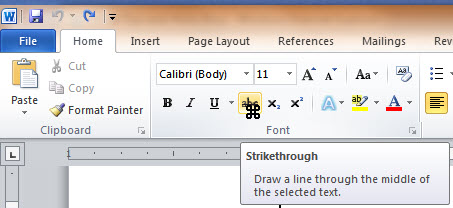 (It works the same way in 2007+) See all Topics powerpoint <Doug Klippert@ 3:56 AM
Comments:
Post a Comment
Tuesday, November 03, 2015 – Permalink – How to Burn Out Your AudianceAudience antagonizersWhat are the three most annoying things about bad PowerPoint presentations? "According to the survey, conducted on the CommunicateUsingTechnology.com web site, the most common complaints are: CommunicateUsingTechnology.com: Annoying PowerPoint Survey See all Topics powerpoint Labels: General, Instructional, Reference, Ribbon, Tips, Tutorials <Doug Klippert@ 3:22 AM
Comments:
Post a Comment
|
